// Kit IOD21 for Claude Code
People who work with AI are already ahead.
You can start today.
The Kit IOD21 puts Claude to work on your Mac: it drafts emails, messages and invoices, and you approve. We install it for you and stay with you on WhatsApp.
No card to start: 4 questions, 2 minutes, then we write to you on WhatsApp.
On 3 November, while the boss was in class in Lille, I did this.
You don't fall behind.
A new version every week with what's new in AI: five came out between 29 October and 4 November. The app updates itself: nothing for you to do.
You're not missing talent: you're missing the tools.
People who made it with AI aren't better than you: they have the right tools. The Kit installs the ones we use every day.
No time? It works while you do something else.
On 3 November Giacomo was in class in Lille: the system did the prep, he gave the ok between lectures.
// The mission: “This is how you use AI”
Helping people who work actually use AI.
IOD21 installs a ready-made system on your computer, with Claude Code, and stays with you until you use it every day.
What do we mean by “this is how you use AI”? Not a course and not a chatbot: a system installed on your computer that does the repetitive work, while you approve.
When the video plays, the steps appear here in English.
// The Kit IOD21
What it does for you, from day one
The Kit's features: turn them on one at a time, when you need them.
-
The Segretario
Reads your email, drafts replies in your style and sends them to your phone: you approve on Telegram.
-
Your customers' WhatsApp
Connect your work number with a QR code: it reads customer messages and drafts replies, which go out only with your ok.
-
Invoices, incoming and outgoing
Reads from Fatture in Cloud the invoices received through SDI, Italy's e-invoicing system, what you owe and who owes you, with VAT and due dates. It drafts your invoices: they go to SDI with your ok.
-
Google
Ads, website visits and Google searches: ask “how did this week go?” and it answers with the real numbers.
-
Meta and Instagram
Ads and your Instagram profile in a clear report. Posts go live only when you give the ok, one by one.
-
Social content with Higgsfield
Every week it suggests 4 posts, with images and short videos made from your photos: you choose which ones to create.
-
Builds your system
Pick the features in the panel: Claude builds your system one piece at a time and shows you how far along it is.
-
Learns every evening
In the evening it rereads your corrections and suggests new rules; in the morning it prepares your daily brief. Rules apply only when you say yes.
-
Your school's website and other portals
Claude builds with you a reader for the portal you use, at your school, university or a supplier: it reads schedules and deadlines and tells you when they change.
You need a Mac and your own Claude subscription; Windows is not tested yet.
// Real app screens (Italian version), sample data
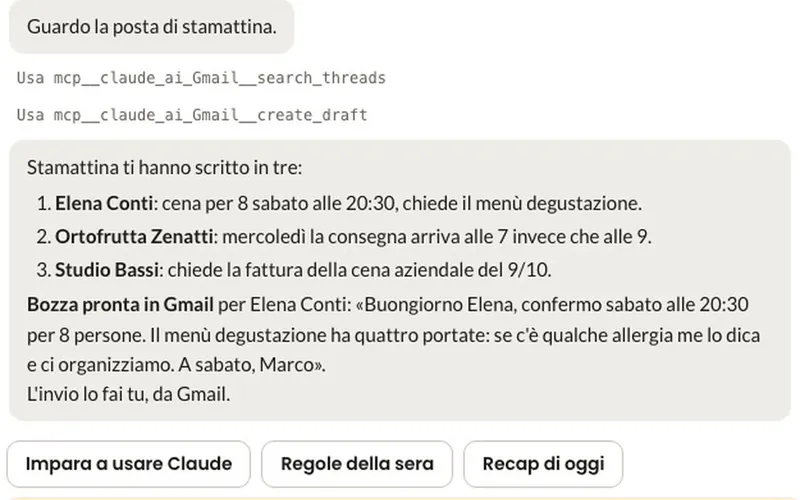
The Segretario. Reads your email and drafts the reply in Gmail: you do the sending. 
Your customers' WhatsApp. Suggests the reply, which goes out only with your OK on the phone. 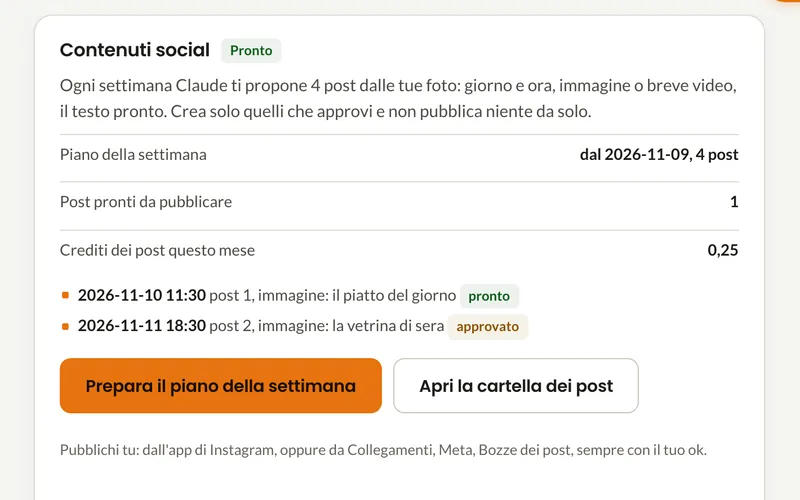
Social content. The week's post plan: it creates only the ones you approve.
// Installation
Up and running in 3 steps
- Leave us your number. We write to you on WhatsApp and answer your questions.
- A 20-30 minute video call. You download the Segretario IOD21 app for Mac and we install it together. You need your Claude subscription.
- Working from day one. You already work with the Segretario, and we stay on WhatsApp.
Hi Marta, I'm IOD21's AI assistant. You told us: professional practice, answering customers takes most of your time, you already use ChatGPT.
With the Kit, Claude reads your email, drafts replies in your style and waits for your ok. Would you like to see it on a video call?
Yes. How much is it in total?
The Kit is €9 a month. On top of that, your Claude Pro subscription, about €18 a month plus VAT, which you pay to Anthropic.
We use it ourselves, every day. With this system we ran a restaurant in Punta Ala: €100,000+ in revenue and 1,300+ covers in one season.
Four questions, then we write to you.
Start the free trialNo card to start, no commitment.